
Download ASUS PC Probe – Real-Time System Monitoring, Fan Speed, Temperature Alerts
Overview
ASUS PC Probe is a specialized utility designed for users of ASUS motherboards, offering real-time monitoring of critical system parameters. The application enables users to track fan speeds, voltage levels, and component temperatures, providing continuous insights into their PC’s health and performance. By delivering live data feeds, ASUS PC Probe helps prevent hardware damage by identifying potential thermal or mechanical issues before they escalate. This tool is particularly valuable for system administrators, PC enthusiasts, and users who rely on stable, high-performance computing environments.
The app serves as a diagnostic and preventive maintenance solution, allowing users to monitor system behavior under load and during idle states. Real-world use cases include optimizing cooling setups, verifying the effectiveness of overclocking configurations, and detecting early signs of failing hardware such as failing fans or voltage fluctuations. For users managing multiple systems or high-end workstations, the ability to receive sonar-based alerts when temperatures exceed safe thresholds adds a critical layer of protection.
Developed by ASUS Corporation, a well-established name in the PC hardware industry, the app reflects the company’s focus on system reliability and user empowerment. Although the developer did not provide additional technical details, the app’s long-standing presence in the system utilities category—first released in 2007—demonstrates its enduring relevance. Its continued availability underscores its utility in the broader PC ecosystem, especially for users seeking precise, real-time feedback on their hardware’s operational status.
Key Features & Functionality
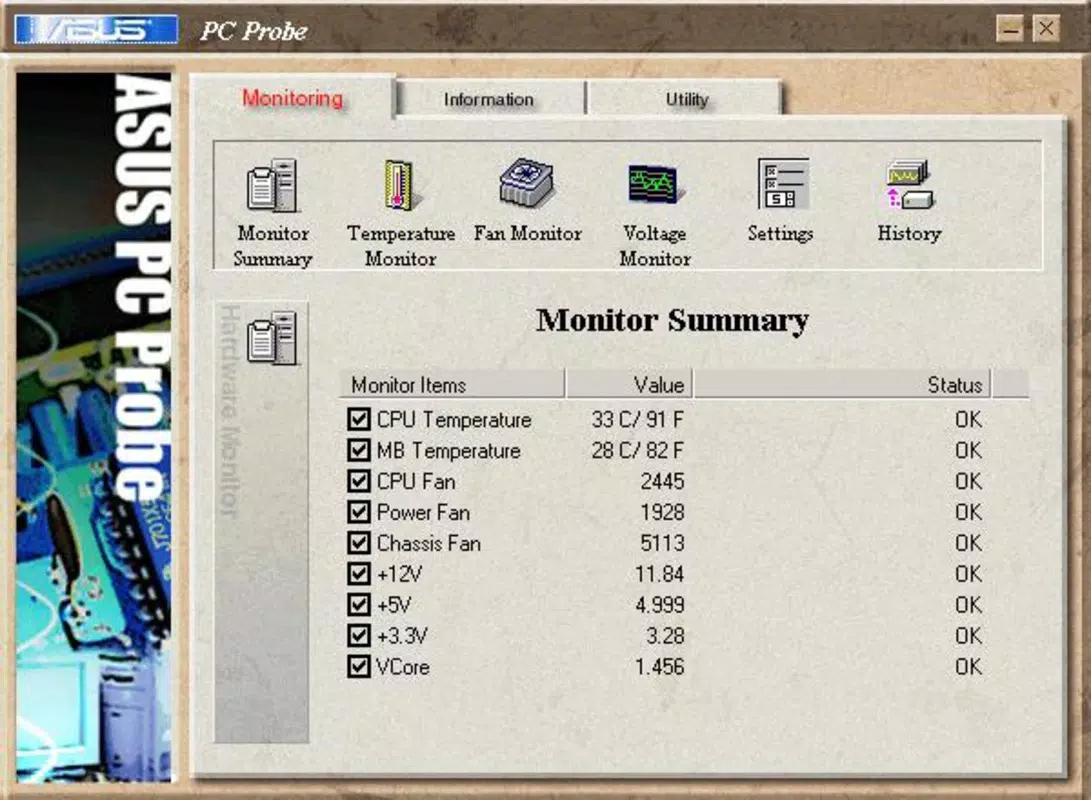
- Real-Time Monitoring: Continuously tracks fan speeds, voltage levels, and temperatures of key components such as the CPU, motherboard, and GPU. This live data stream allows users to assess system behavior under various workloads and detect anomalies instantly.
- Temperature and Fan Alerts: Issues sonar notifications when temperatures rise above safe thresholds or when fan speeds drop below safe levels. This proactive alert system helps prevent overheating and potential hardware failure, especially during intensive tasks like gaming or rendering.
- System Resource Tracking: Monitors CPU usage, memory consumption, and available disk space. This feature supports performance optimization by identifying bottlenecks and guiding users in managing storage and processing demands.
- Detailed Component Information: Displays processor type, clock speed, and other hardware specifications. This data aids users in understanding their system’s capabilities, particularly useful for those considering upgrades or overclocking.
- User-Friendly Interface: Features an intuitive layout with clearly labeled metrics and straightforward navigation. The design ensures that both novice and experienced users can access critical data without confusion or technical barriers.
For example, a gamer running a high-performance rig can use ASUS PC Probe to verify that cooling systems are functioning properly during extended gameplay sessions. A system administrator managing a workstation fleet might use the tool to ensure all machines remain within safe operating parameters. The combination of real-time data and proactive alerts makes this app a practical tool for maintaining system integrity across diverse use cases.
Interface, UX & Performance
ASUS PC Probe presents a clean, functional interface that prioritizes clarity and accessibility. The layout organizes key metrics—such as temperature, fan speed, and voltage—into clearly labeled sections, enabling users to quickly assess system health at a glance. Navigation is straightforward, with minimal clicks required to access detailed views or settings.
The visual style is utilitarian, focusing on readability over aesthetics. Data is displayed using color-coded indicators to highlight normal, warning, and critical states, enhancing situational awareness. Although the developer did not list formal performance metrics, the app’s lightweight footprint of 4.5MB suggests efficient resource usage, making it suitable for systems with limited overhead.
Responsiveness appears consistent across device categories, though specific performance benchmarks were not disclosed. Stability is implied by the app’s long-standing release history and continued functionality since 2007. Users can expect reliable operation during prolonged monitoring sessions, with minimal impact on system performance. The application does not appear to require frequent updates, indicating a mature and stable codebase.
Platform Compatibility & Technical Requirements
ASUS PC Probe is designed for the Windows platform, with a software version of 2.0.1.1. The file size is 4.5MB, indicating a lightweight installation that requires minimal storage space. The developer did not specify minimum OS requirements or compatibility details beyond the platform, so users should exercise caution when installing on newer Windows versions.
Although the app was first released in 2007, its continued availability suggests backward compatibility with modern Windows systems. However, users should verify functionality on their specific OS version, as legacy applications may encounter issues with updated drivers or system security policies. The absence of official compatibility information means that performance on newer platforms remains unverified.
Pros and Cons
Pros
- Provides real-time monitoring of critical system parameters like temperature, fan speed, and voltage.
- Includes sonar alerts for overheating and fan failure, enhancing system safety.
- Offers detailed insights into CPU and system resource usage for performance optimization.
- Lightweight design with a small file size of 4.5MB.
- Intuitive interface suitable for users of all technical levels.
Cons
- Compatibility with modern Windows versions is not officially confirmed.
- Developer did not provide technical specifications or system requirements.
- Limited to Windows platform; no support for macOS or Linux.
- No visible update history or recent development activity.
- Does not include advanced features like logging, graphing, or remote access.
FAQ
Is ASUS PC Probe safe to download and install?
Yes, the app is developed by ASUS Corporation, a trusted hardware manufacturer. It is free to download and does not include malware or intrusive ads. However, users should ensure they download from official sources to maintain security.
Can I use ASUS PC Probe on Windows 11?
While the app was originally released in 2007, it may function on Windows 11. However, the developer did not specify compatibility with newer operating systems, so performance may vary.
Does ASUS PC Probe require administrator privileges?
Although not specified, many system monitoring tools require elevated permissions to access hardware sensors. Users may need to run the app as an administrator for full functionality.
Is ASUS PC Probe available for mobile devices?
No, the app is designed exclusively for Windows desktops and laptops. There is no official mobile version available for Android or iOS.
How often does ASUS PC Probe update?
The developer has not disclosed an update schedule. The current version, 2.0.1.1, has remained unchanged for many years, suggesting limited active development.
Final Thoughts
ASUS PC Probe remains a reliable tool for users with ASUS motherboards who need real-time insights into their system’s health. Its ability to monitor temperature, fan speed, and voltage—along with proactive sonar alerts—makes it a valuable asset for maintaining stability and preventing hardware damage. While the app lacks modern features like data logging or cross-platform support, its simplicity and focus on core functionality continue to serve enthusiasts and professionals alike.
For users managing high-performance systems or those concerned about thermal safety, the app delivers consistent value without bloat. Despite its age and limited update history, its lightweight design and proven track record make it a trustworthy choice. If you own an ASUS motherboard and want a straightforward way to monitor your PC’s vital signs, ASUS PC Probe is a practical solution.
Download ASUS PC Probe now


